Create and navigate
Open Flowboards and create a board. All, Personal and Thread-linked filters help find it again. Pan the canvas and zoom to explore. Nearby visible content loads first; let visible cards finish loading before judging a preview as empty.
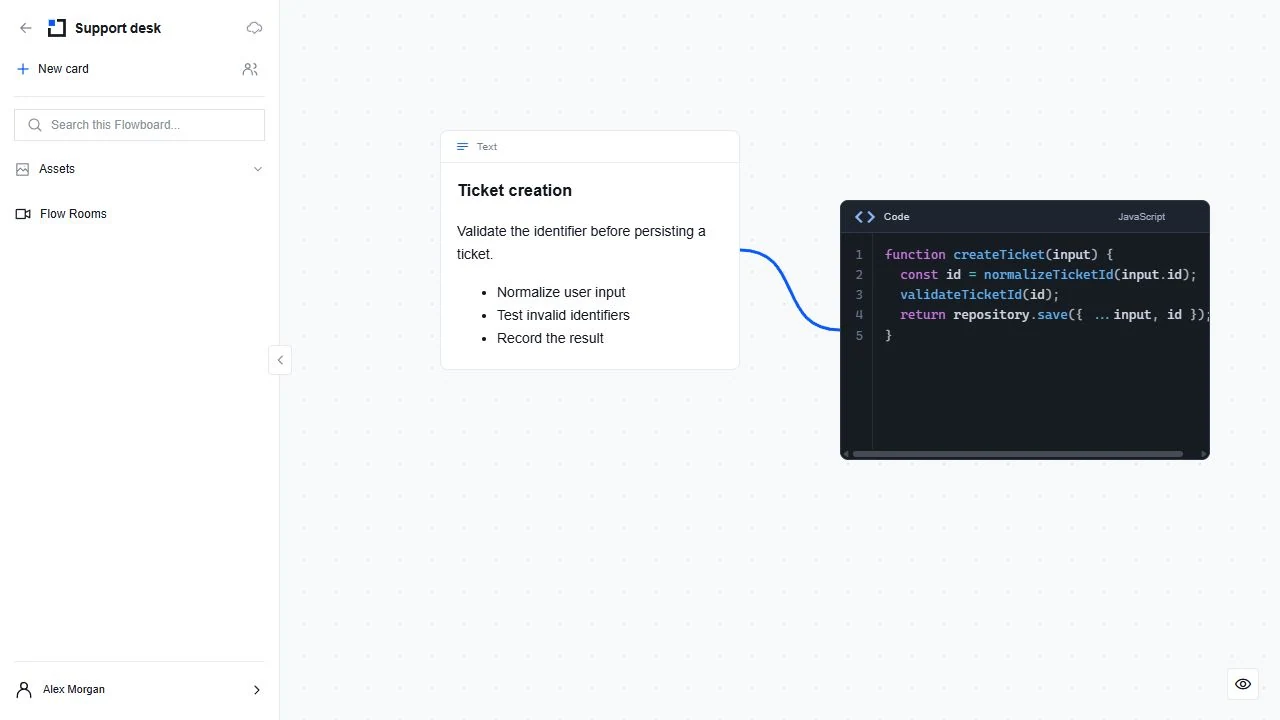
Move, edit and connect
Single-click or drag a text/code card to select or move it. Double-click to edit its content. Leave text editing before dragging. Select a card to reveal connection handles; nearby target cards reveal theirs while you draw a connection. Connectors should follow saved card positions.
Cards and Assets
Use Add card in the floating toolbar to add supported content. Open Assets to reuse material you can access; a copy does not grant access to its source. Click your account icon to open Settings. Theme selection is centralized in Settings → Appearance.
Talk while working on the board
Open Flow Rooms in the Flowboard control panel to see rooms and join with camera, audio or listen-only. Personal and thread-linked boards use their existing collaboration permissions; read-only access is not sufficient to join. See the dedicated Flow Rooms guide for room admission, microphone permissions and staying connected while working.
Invite or share a group
Use Access to invite a Circle contact with the intended role. They accept or decline in Circle. Use a group’s three-dot Share action to send a read-only group snapshot to a contact. Recipients can explore that group, not reorganize it or see the rest of the board through the share. The shared copy remains if you later delete the original group.
Agents beside the board
While an agent is active on the board, open Agent work in the floating toolbar to see the task, ask questions or locate its current work. Permitted native actions use the same saved revisions, card editing and locked-evidence checks as human actions. Room conversations and media stay human-only. An agent can see room presence on a permitted board and ask a participant through the shared task.
Changes not saving?
Check cloud/sync status and connectivity. Keep unsaved work open. Follow conflict/recovery messages instead of overwriting a collaborator’s edit. Locked evidence cards/groups are intentionally immutable; use new editable copies.