Open a packet
Open Dev Monitor → Review and select a packet. Check its device, activity date and processing state. If the deployment has AI intake off, the page says so. Receiving a packet does not prove it has been interpreted.
Check what will be retained
Read the proposed account, then inspect its source.
- Choose the default thread and active phase, or check suggested destinations when available.
- Inspect each timestamp, filename and facts. Use View details for supplied code changes, diagnostics and execution output.
- Check individual destinations for work spanning multiple phases. Uncertain assignments need your input.
- Uncheck or delete unwanted activity. Exclude packet keeps the whole packet out of phase timelines; read its confirmation.
- Choose Save review to retain choices. Save and lock finalizes the selected work early; it is not a reversible save.
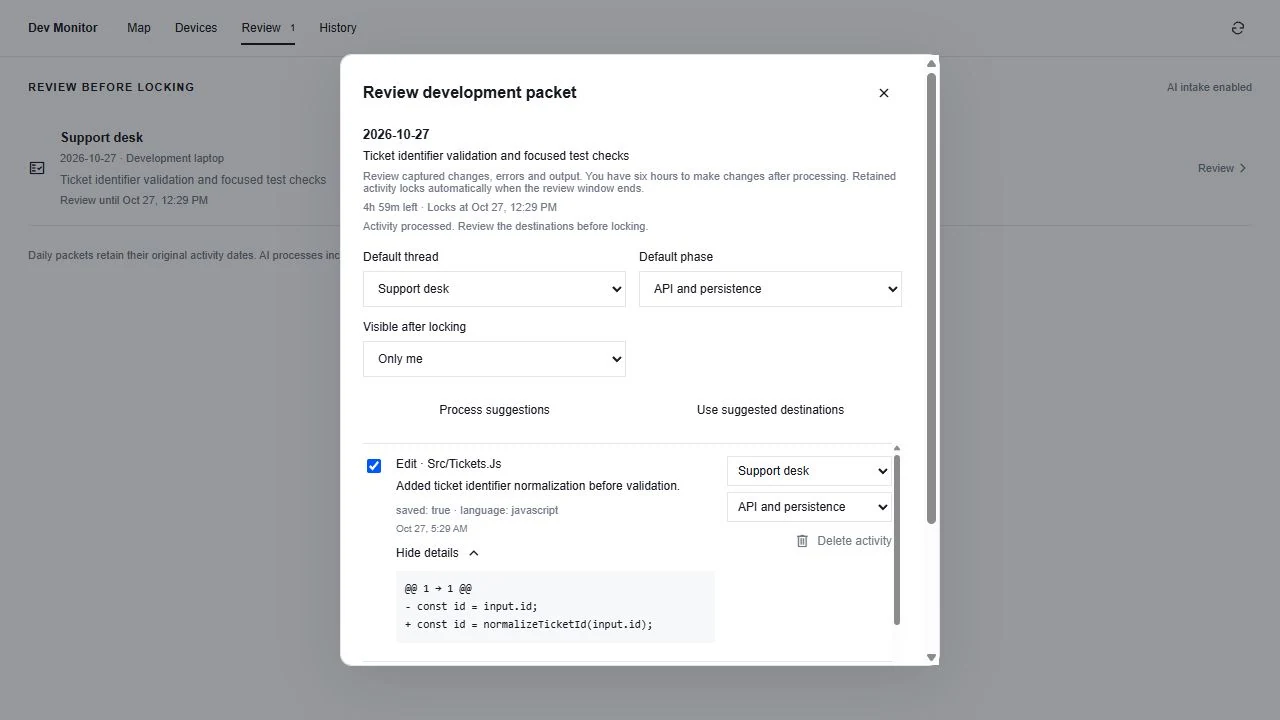
The six-hour window
Review lasts six hours after processing opens the window; use the deadline shown on the packet. Saving does not restart that clock. Retained activity is eligible for automatic locking after the deadline. Missing required destinations or processing issues can leave it awaiting input or automatic locking; do not assume an unresolved packet already reached a ledger.
Read the resulting work
Retained activity enters its assigned phase’s local-development ledger and contributes to thread understanding through configured processing. Open the phase’s local-development block to read the contributor’s daily account and expand timestamped evidence. Locked source evidence and its preserved destinations cannot be rewritten through ordinary editing.
A summary is not the source
The account explains meaningful progress; evidence shows the captured changes, errors and output in order. An earlier failure is not resolved merely because a later edit exists. Look for a confirming result. Treat missing detail as a capture gap instead of inferring it from polished wording.